Update with confidence, without worry that something will break.
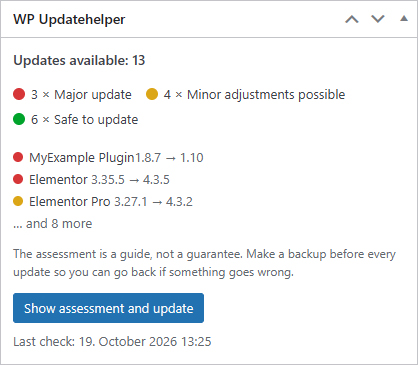
Updatehelper gives you a traffic-light guide for every update to your WordPress website. Before you click, you will know whether it is safe to proceed or better to ask someone first.
Does this sound familiar?
It is understandable to put off updates, but over time that leaves a website less secure. Updatehelper takes the guesswork out of updating.
Three colors. That is all you need to remember.
How it works
Set it up once
Install the plugin on your website. After that, it takes care of the checks for you.
It checks automatically every day
Updatehelper checks what changes in each release and compares it with what your website actually uses.
You get a notification
When updates are available, you get an email with the traffic-light color and a short explanation. The same indicator also appears next to the update button.
Download Updatehelper for free.
The free version checks updates directly on your WordPress website. No license key needed.
What you get
A note on limitations
The traffic light is an informed assessment, not a guarantee. It is based on the information publishers provide about their updates and our many years of experience. Updatehelper cannot know what is not disclosed.
Keeping a current backup of your website is still important, even when the light is green.
Frequently asked questions
Do I need to know WordPress?
No. If you can log in and click “Update”, that is enough.
What should I do when it is yellow or red?
Forward the email to the person who manages your website. They will immediately see what needs attention.
How do I get set up?
Install the plugin, then go to Dashboard -> Updates -> Check now. Your first results will be ready in moments.